Digital Archiving for Longevity: Preserving Your Online Memories for 10+ Years

Digital Archiving for Longevity: Preserving Your Online Memories for 10+ Years
In an increasingly digital world, our lives are meticulously documented and stored in various online and offline formats. From cherished family photos and videos to essential documents, creative projects, and personal correspondence, our digital footprint is vast and ever-expanding. However, the transient nature of technology and the ever-present threat of data loss mean that simply storing these digital assets isn’t enough. To truly safeguard our digital heritage, we must embrace the principles of digital archiving longevity. This comprehensive guide will delve into the strategies, tools, and best practices required to preserve your invaluable online memories and critical data for a decade, or even a lifetime.
The concept of digital archiving longevity goes far beyond simple backup. It involves a proactive and systematic approach to managing your digital assets, ensuring their accessibility, integrity, and usability for years to come, regardless of technological shifts or data degradation. Imagine looking back at your digital photo albums from a decade ago, or accessing an important document from your early career – without a robust archiving strategy, these memories and resources could be lost forever. This article aims to equip you with the knowledge to prevent such losses and build a resilient digital legacy.
Understanding the Challenges of Digital Preservation
Before we dive into solutions, it’s crucial to understand the unique challenges inherent in digital preservation. Unlike physical artifacts that degrade visibly over time, digital data faces more insidious threats:
- Technological Obsolescence: File formats, software, and hardware become outdated at an alarming rate. Can you open a .flo file from 1995 today? Probably not without specialized tools.
- Data Degradation (Bit Rot): Digital storage media, even solid-state drives, can suffer from bit rot, where individual bits of data flip, leading to corrupted files.
- Storage Media Lifespan: Hard drives, SSDs, and even optical media have finite lifespans. They will eventually fail.
- Cyber Threats: Ransomware, viruses, and hacking attempts can lead to data loss or compromise.
- Human Error: Accidental deletion, misplacement, or incorrect formatting are common causes of data loss.
- Organizational Chaos: Without a clear naming convention and folder structure, finding specific files years later can be a nightmare.
Addressing these challenges is at the heart of achieving true digital archiving longevity. It requires a multi-layered approach that combines redundant storage, format migration, and disciplined file management.
The Cornerstone of Digital Archiving: The 3-2-1 Backup Rule
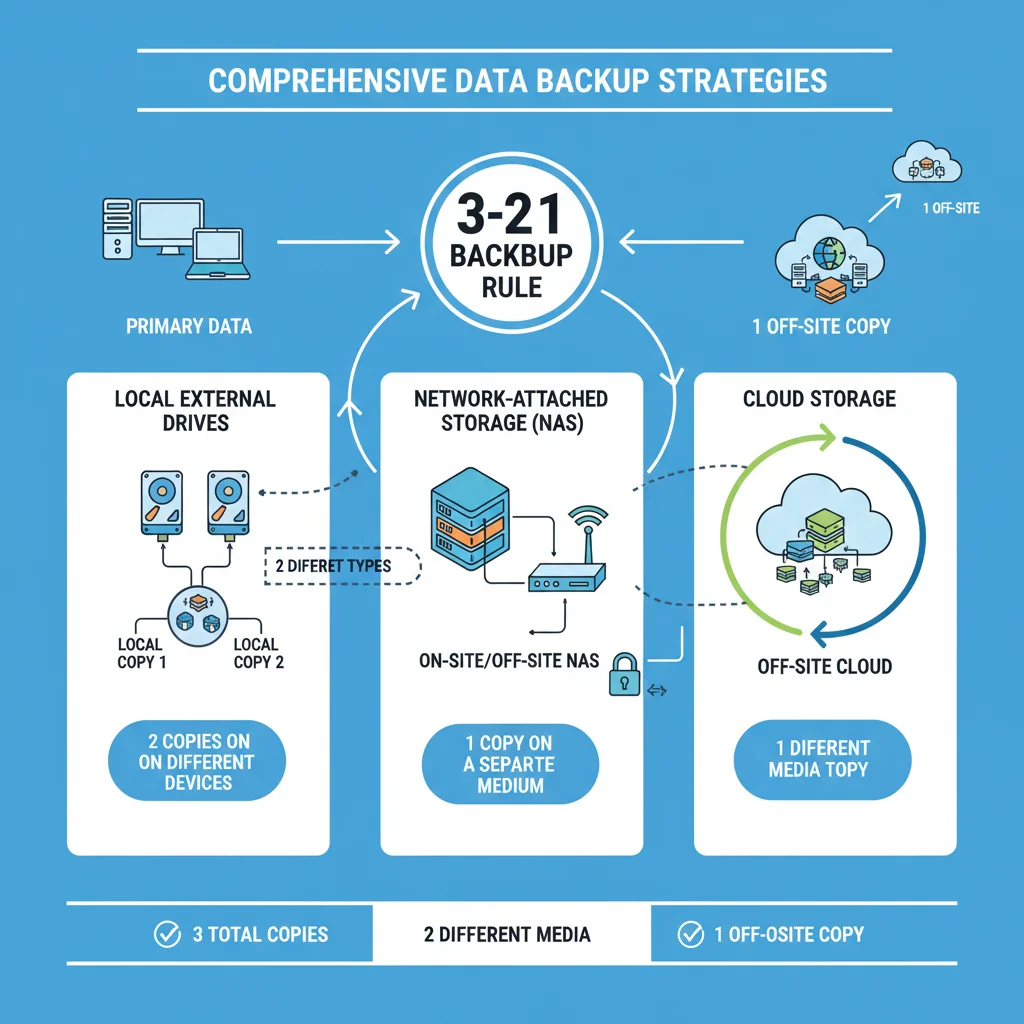
Any discussion about digital archiving longevity must begin with the fundamental principle of backup. The industry-standard 3-2-1 backup rule is your first line of defense against data loss:
- Three Copies of Your Data: Always have at least three copies of your important files. This includes your primary working copy and two backups.
- Two Different Media Types: Store your copies on at least two different types of storage media. For example, your computer’s internal drive (first copy), an external hard drive (second copy), and cloud storage (third copy). This mitigates risks associated with a specific media type failing.
- One Offsite Copy: At least one of your backups should be stored offsite. This protects against localized disasters like fire, flood, or theft that could destroy all local copies.
Implementing the 3-2-1 rule significantly increases the resilience of your data. Let’s explore the practical applications of each component.
Implementing Local Backups: External Drives and NAS
External hard drives are a popular and cost-effective solution for local backups. They offer fast transfer speeds and significant storage capacity. For enhanced digital archiving longevity, consider the following:
- Reliable Drives: Invest in high-quality, reputable external hard drives.
- Redundancy: Don’t rely on just one external drive. Have at least two, and rotate them for backups.
- Backup Software: Use automated backup software (e.g., Mac’s Time Machine, Windows File History, or third-party solutions like Acronis True Image, EaseUS Todo Backup) to ensure consistent and complete backups.
- Network-Attached Storage (NAS): For more advanced users or households with multiple devices, a NAS device is an excellent investment. A NAS is essentially a small server with multiple hard drives that connect to your home network. It can be configured with RAID (Redundant Array of Independent Disks) to mirror data across multiple drives, providing an extra layer of protection against single drive failure. Many NAS systems also offer built-in backup features and can sync with cloud services, further bolstering your digital archiving longevity strategy.
Leveraging Cloud Storage for Offsite Redundancy
Cloud storage is indispensable for fulfilling the ‘one offsite copy’ requirement of the 3-2-1 rule. It offers convenience, accessibility, and robust infrastructure. Popular cloud storage providers include:
- Google Drive/Photos: Excellent for general file storage and photo backups, often integrated with other Google services.
- Microsoft OneDrive: Seamless integration with Windows and Office 365, offering a similar experience to Google Drive.
- Dropbox: Known for its simplicity and cross-platform compatibility, a favorite for file syncing and sharing.
- Apple iCloud: Essential for Apple users, providing backups for iOS devices and syncing across Apple ecosystems.
- Backblaze/CrashPlan: These services specialize in continuous, unlimited backup of your entire computer for a fixed annual fee. They are often less about file syncing and more about comprehensive disaster recovery, making them powerful tools for digital archiving longevity.
When choosing a cloud provider for long-term archiving, consider:
- Storage Capacity and Cost: Match your needs with available plans.
- Security Features: Look for end-to-end encryption, two-factor authentication, and a strong privacy policy.
- Reliability and Uptime: Choose reputable providers with a proven track record.
- File Versioning: The ability to revert to previous versions of a file is crucial for recovering from accidental changes or corruption.
Strategic File Management for Long-Term Accessibility
Beyond simply having multiple copies, effective file management is critical for digital archiving longevity. If you can’t find a file, or if it’s in an unusable format, it’s as good as lost.
Consistent Naming Conventions
Imagine trying to find a photo from a specific vacation five years from now if all your photos are named ‘IMG_0001.jpg’ through ‘IMG_9999.jpg’. A consistent and descriptive naming convention is vital. Consider:
- Date-Based Prefixes: ‘YYYYMMDD_EventDescription_001.jpg’ (e.g., ‘20231026_FamilyReunion_001.jpg’).
- Project-Based Naming: For work files, include project codes, versions, and dates.
- Avoid Special Characters: Stick to alphanumeric characters, underscores, and hyphens to avoid compatibility issues across different operating systems or software.
Logical Folder Structure
Organize your files into a hierarchical folder structure that makes intuitive sense to you. A common approach is to categorize by year, then by month, then by event or project:
My Digital Archive/
├── Photos/
│   ├── 2023/
│   │   ├── 2023-01_NewYearsParty/
│   │   └── 2023-02_SkiTrip/
│   └── 2024/
│       ├── 2024-03_SpringBreak/
├── Documents/
│   ├── Financial/
│   │   ├── 2023_Taxes/
│   │   └── BankStatements/
│   ├── Personal/
│   └── Work/
├── Videos/
└── Music/
The key is consistency. Once you establish a system, stick to it.
Metadata and Tagging
Metadata (data about data) can significantly enhance the discoverability of your archived files. Most operating systems and photo management software allow you to add tags, descriptions, and keywords. For photos, embedding EXIF data (date taken, camera model) is automatic, but adding location data, names of people, and event descriptions can be invaluable for digital archiving longevity.
Mitigating Obsolescence: File Formats and Migration
One of the biggest threats to digital archiving longevity is technological obsolescence. A file format that is standard today might be unreadable in 10-20 years. Proactive format management is crucial.
Choosing Stable File Formats
Whenever possible, store your important data in open, non-proprietary, and widely supported formats. These formats are less likely to become obsolete because their specifications are publicly available, allowing different software to read them over time.
- Documents: Prefer PDF/A (a long-term archival standard for PDF), TXT, RTF. Avoid niche word processor formats.
- Images: TIFF (lossless, high quality), JPEG (ubiquitous, good compression), PNG (good for graphics with transparency). Avoid proprietary raw formats for long-term archiving unless you also keep the conversion software.
- Audio: WAV (uncompressed), FLAC (lossless compressed), MP3 (ubiquitous, good for general listening).
- Video: MP4 (H.264 codec is widely supported), AVI.
Regular Format Migration
Even with stable formats, it’s wise to periodically review your archived files (every 5-10 years) and migrate them to newer, widely supported formats if necessary. This process is called format migration. For instance, if you have very old documents in a deprecated word processor format, converting them to PDF/A now will ensure their readability far into the future. This active management is a hallmark of effective digital archiving longevity.
Security and Integrity: Protecting Your Archives
Ensuring the security and integrity of your archived data is paramount. After all, what good is an archive if it’s compromised or corrupted?
Encryption
Encrypt sensitive files, especially those stored in the cloud or on external drives that might be lost or stolen. Most operating systems offer built-in encryption (e.g., BitLocker for Windows, FileVault for macOS). Cloud providers also often offer encryption at rest and in transit. For maximum security, consider client-side encryption before uploading to the cloud.
Checksums and Data Integrity Checks
How do you know if your archived files are still intact and haven’t suffered from bit rot? Checksums are a powerful tool. A checksum is a small string of characters that represents the unique digital fingerprint of a file. If even a single bit in the file changes, its checksum will change. Regularly generating and comparing checksums of your archived files against their original checksums can detect corruption early. Tools like FreeFileSync or rsync can often perform these checks during synchronization.
Access Control and Permissions
Control who has access to your archived data. Use strong, unique passwords for all accounts associated with your storage solutions. Enable two-factor authentication (2FA) wherever possible. For shared archives, carefully manage user permissions to prevent accidental deletion or unauthorized access.
The Human Element: Periodic Review and Maintenance
Technology can automate many aspects of digital archiving longevity, but human oversight remains critical. An archive is not a static entity; it requires periodic attention.
Scheduled Reviews
Set a recurring schedule (e.g., annually or bi-annually) to review your archived data:
- Verify Backups: Ensure all backups are running correctly and that files are actually being copied. Periodically perform a test restore of a few files to confirm they are accessible and uncorrupted.
- Check Storage Media Health: Monitor the health of your external hard drives and NAS drives. Many drives come with SMART (Self-Monitoring, Analysis, and Reporting Technology) diagnostics that can warn of impending failure.
- Consolidate and Declutter: Remove duplicate files and unnecessary clutter. This not only saves space but also makes your archive more manageable.
- Update File Formats: As discussed, consider migrating older, less stable formats to newer, more robust ones.
- Review Organization: Is your folder structure still logical? Are your naming conventions consistent? Adjust as needed.
Digital Legacy Planning
Consider what happens to your digital assets after you’re gone. This is a crucial, often overlooked aspect of digital archiving longevity. Document your accounts, passwords (use a secure password manager and share access securely with a trusted individual), and instructions for accessing and managing your digital legacy. Many cloud services now offer digital legacy features that allow you to designate beneficiaries for your data.

Advanced Strategies for Ultimate Longevity
For those with extremely critical data or a strong desire for maximum digital archiving longevity, consider these advanced strategies:
Long-Term Archival Storage Services
Some services specialize in ultra-long-term archival storage, often employing technologies like LTO (Linear Tape-Open) tape libraries or even specialized optical discs designed for centuries of data retention. These are typically more expensive and geared towards institutions, but some providers offer consumer-level options.
Decentralized Storage (Blockchain-based)
Emerging technologies like decentralized storage networks (e.g., Filecoin, Storj) offer a novel approach to data preservation. By distributing encrypted data across a global network of independent nodes, they aim to create highly resilient and censorship-resistant archives. While still relatively new, these could play a significant role in future digital archiving longevity solutions.
Digital Asset Management (DAM) Systems
For individuals with vast collections of media, a personal Digital Asset Management (DAM) system can be invaluable. These systems provide robust indexing, metadata management, searching, and version control capabilities, making it easier to manage and retrieve thousands or even millions of files over time. While often enterprise-level, simpler personal DAM software exists.
Conclusion: Your Digital Heritage, Secured for the Future
The journey to achieving digital archiving longevity is an ongoing one, not a one-time task. It requires a commitment to understanding the challenges, implementing robust backup strategies, practicing meticulous file management, and staying informed about evolving technologies. By adopting the principles outlined in this guide – the 3-2-1 backup rule, strategic file organization, proactive format management, and regular security checks – you can transform your ephemeral digital data into a resilient, accessible, and enduring digital heritage.
Your online memories, cherished photographs, important documents, and creative works are more than just bits and bytes; they are fragments of your life, your history, and your legacy. Invest the time and effort today to ensure they remain vibrant and accessible for you and future generations to enjoy, for 10+ years and beyond. The peace of mind that comes with knowing your digital world is securely preserved is truly priceless.